What is the Powercab CL 112?
We’ve all experienced the struggle of hauling our equipment into a venue, frequently enough from a considerable distance or up endless flights of stairs. Fortunately, advancements in digital amp modeling and profiling technology-such as the Line 6 Helix stadium XL, Neural DSP Quad Cortex, and Kemper Profiler-along with various pedal preamps, have largely replaced customary amplifiers and cabinets in many guitar setups. This shift has made the task of transporting gear significantly less strenuous for guitarists.
This inherent transparency distinguishes the FRFR cabinet from a traditional guitar speaker, which inherently shapes your tone. Actually,this tonal coloration is a crucial aspect of its function; simply disable the cabinet emulation on your modeler to experience the stark contrast.
Moreover, cabinet emulations are filtered through the microphone used to capture them, further distancing them from the authentic sound of a real cabinet and imparting a polished, studio-like quality.

Introducing the Powercab CL. This is a genuine guitar speaker and cabinet, designed to work seamlessly with your digital amp modeler when cabinet emulation is disabled, delivering that coveted amp-in-the-room sensation.
True to Line 6’s innovative spirit, the Powercab CL includes several unique features. It boasts a three-band EQ, allowing you to adjust the cabinet’s response to suit the acoustics of the room, much like a traditional amplifier.
So, this is just another FRFR speaker, right? Well, to be blunt, no.
The Powercab CL features a speaker-emulated output, enabling you to send audio directly to a PA system. Along with the natural sound of the physical speaker, it offers six distinct voicing options: Crisp (Roland JC120 Speaker), Jarvis (Jensen P12Q), Jetson (Jensen C12K), Essex (Celestion Alnico Blue), Green (Celestion G12M Greenback), and Vintage (Celestion Vintage 30).MIDI control is also included.
It’s crucial to clarify that these voicings are not cabinet emulations; rather, they are modifications to the sound of a real speaker, reflecting the tonal characteristics of the legendary speakers they emulate.
if the Powercab CL lives up to its promises, it could bridge the gap for those who wish to utilize modelers while yearning for the tactile sound and feel of air being pushed by a speaker.
Specifications

- Launch price: $449/£439/€499
- Type: Powered guitar cabinet
- Origin: Malaysia
- Output: 100w
- Speaker: 12″, Line 6 HC 100 custom-designed speaker
- Features: 6 voices modeled on iconic speakers, three-band EQ, emulated XLR out, MIDI control
- Controls: Voice, Volume, Low, Mid, High
- Connectivity: 1 x combined input (XLR/jack), speaker-emulated XLR out
- Weight: 31.9lbs/14.5kg
- Dimensions: 564 x 488 x 262mm
- Contact: Line 6
Construction Quality

Build Quality Rating: ★★★★
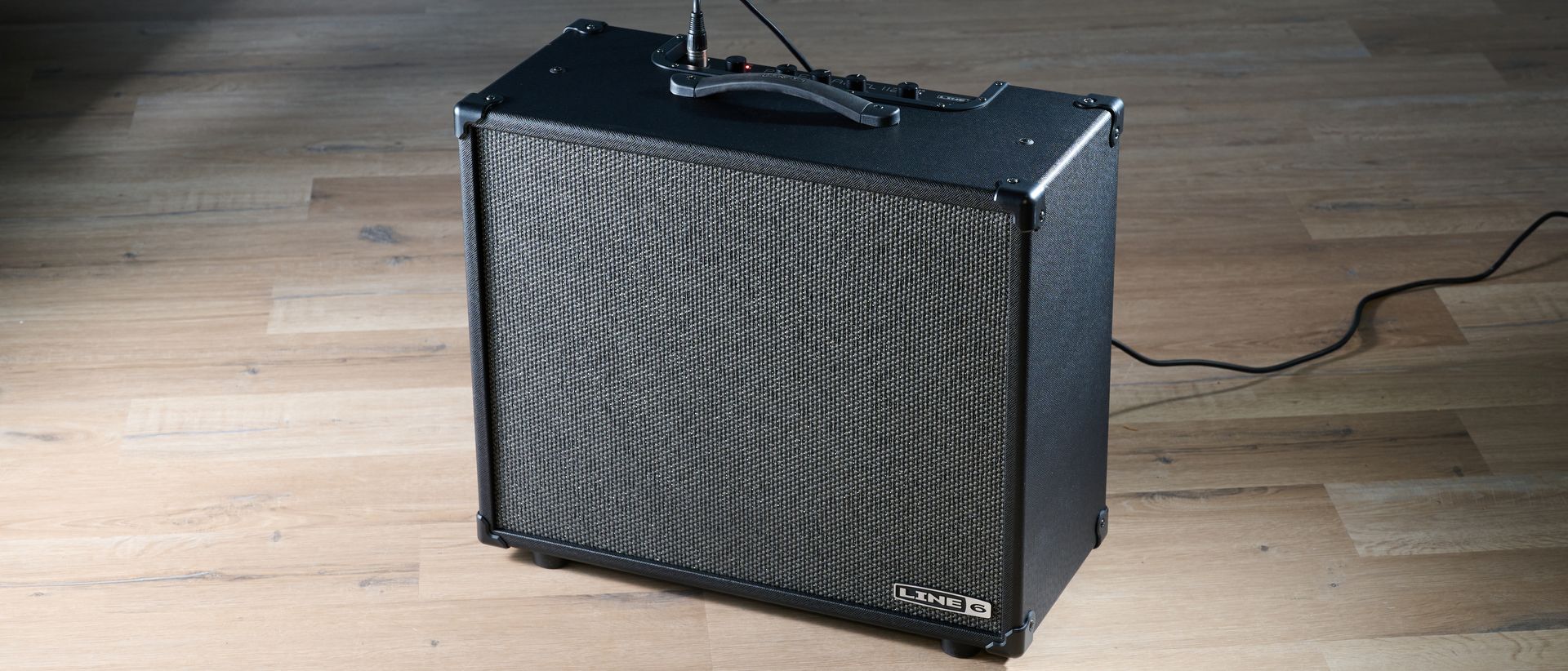
Upon unboxing the Powercab CL 112, the first thing that strikes me is its lightweight design. Given that it is a powered cabinet, I expected it to weigh more than its 14.5kg. One of the primary reasons guitarists transition to digital gear from bulky pedalboards and heavy amplifiers is for enhanced portability, making a lightweight cabinet essential.
Its sleek black wooden sides and gray baffle create a minimalist aesthetic that, from my personal perspective, adds a touch of elegance, complemented by the stylish control knobs and top panel.
The controls offer a satisfying resistance, though the notch indicating the zero position (where the EQ is neutral) could be more pronounced.

The open-back design feels robust, and the thick rubber handle suggests it can endure considerable wear and tear. However, the plastic corner braces seem a bit flimsy.
the construction is solid, and despite a few minor issues, I wouldn’t hesitate to toss this into the back of a van for a tour across numerous venues. However, I do miss the tilt feature that allowed the original Powercab to angle backward.
If you haven’t tried angling your amp while performing live, I highly recommend it! Instead of the sound being directed at your knees, it projects towards your head, making it much easier to hear yourself. This was a feature I appreciated on the original Powercab, and it’s unfortunate that it wasn’t included in the CL model.
Ease of Use

Usability Rating: ★★★★★
Who really wants to sift through a manual? Fortunately, with the Powercab CL, there’s little need for that. Simply connect your modeler to the input, select the speaker voice, adjust the three-band EQ if desired, crank up the volume, and you’re ready to rock.
This simplicity is enhanced by the five knobs-Voice, Low, Mid, high, and volume-clearly labeled and conveniently located on top of the cabinet, just like a traditional guitar amplifier. It’s worth noting that the Powercab CL is designed to work best with an input that bypasses cabinet emulation from the modeler, which may require some routing adjustments depending on your setup. However,this is easily manageable with the Line 6 Helix Floor that I used for testing.
Additionally, there are two small buttons on the top panel, each equipped with an LED indicator. One toggles the speaker voice, while the other changes the impulse response assigned to the XLR output located at the back of the cabinet.

The first button’s LED not onyl shows whether the Voice control is active but also flashes red when the input signal is too strong. The second button changes color to indicate which impulse response (IR) is selected for the XLR output: white for the selected voice, pink for user-loaded IRs (with six slots available, selected via the voice knob), and blue for the default IR that mirrors the real speaker without any modifications.
To load user IRs, the Powercab CL app provides a straightforward drag-and-drop interface, complete with Hi Cut, Lo Cut, and Level controls. This user-friendly design ensures you can quickly access the necessary adjustments without any hassle.
On the rear panel, you’ll find the XLR output, a USB-B port, and a MIDI input. while I would prefer a more common USB-C connection, as it’s more likely to be readily available, the inclusion of MIDI is a valuable feature. It allows you to switch the speaker voice and IR for the XLR output as you change amps on your modeler, which can be quite useful as we are not emulating cabinets on our modelers.
Additionally, there are two switches: one to bypass the speaker voice and EQ, and another for a ground lift. In my experience,turning off the speaker voice and setting the EQ to flat achieves the same result as bypassing them,making the bypass switch feel somewhat redundant. However, if you want a flat response and need to ensure nothing gets accidentally adjusted, having this option is beneficial.
Sound Quality
Sound Rating: ★★★★
With seven options available through the Voice control, I can either use the speaker’s natural sound or activate one of the six voices that modify the tone to emulate iconic speakers.
Using my Line 6 Helix Floor with a preset I often use live featuring the Grammatico GSG amp model, I turn off the cabinet emulation and connect directly to the Powercab CL.
to assess the difference a real speaker makes, I set up the Powercab CL alongside an FRFR (using a Tonex Cab) and compared it with the modeler’s cabinet emulation activated for the Tonex Cab and deactivated for the Powercab through some routing on the Helix. the FRFR offers a more focused and polished sound, while the Powercab’s real speaker feels open and smooth.
Typically,I would spend time adjusting mic settings on cabinet emulations,fine-tuning high-cuts,etc., but with the Powercab CL, this isn’t necessary. This aligns with the experience of using a real speaker compared to an emulation or IR through an FRFR cab. Thus,my initial impressions confirm that the Powercab CL delivers on its promises.
When focusing on the Powercab CL, I find the default speaker setting (with Voice control off) to be quite rich in low mids, which can sound a bit muddy but remains enjoyable, providing a smooth experience at higher volumes. the real excitement, however, comes from activating the Voice control and experimenting with the six additional voicing options.
The Vintage voice instantly enhances the full-range experience, reducing the mid frequencies while accentuating the highs. The Green setting is similar but reintroduces some mids,while the Essex adds a bit more high-end with a delightful jangle.
With the Jetson, we return to a mid-forward sound, but with much more clarity than the speaker’s natural tone. The Jarvis setting brings back a fuller range with a Fender-like mid scoop.
The Crisp setting is the only voicing I don’t favor.
Lastly, the Crisp setting is the only one I find less appealing. It has a pronounced high-end that sounds somewhat thin to my ears. However, the name “Crisp” serves as a fair warning, and it can be useful for brightening darker tones, much like the speaker it emulates.
As with any traditional guitar amp, the ideal voice will depend on the digital amp you are using. Personally, I find the Jarvis’s smooth, scooped character particularly enjoyable, especially when paired with the mid-humped amp models I prefer in my digital setups. Thus, I can confidently say that this is my favorite option.

The EQ is notably powerful, so adjustments should be made carefully to avoid compromising a good tone. However, it does allow for fine-tuning the cabinet to suit any room.
But that’s not all; there’s also a selection of IRs available on the XLR output. Designed for direct connection to an interface or PA, it defaults to an IR that mimics the natural sound of the powercab’s speaker. You can switch to one of six IRs that correspond with the speaker’s Voice selection or use user-loaded IRs.
I’ve noticed that the IRs paired with the speaker voices reflect the tonal shifts from one voice to another, but they tend to sound thin and harsh in comparison. While they can be adjusted via the app,I recommend avoiding them. The default IR, which is modeled on the speaker’s base tone, is a hidden gem.
As previously mentioned,the speaker has a lot of low mid information,resulting in a thick sound that lacks some clarity. Thus, having an IR that thins it out is advantageous. It feels rounded and responsive, making it a joy to play.
Final Thoughts

While it may be tempting to compare the Powercab CL with FRFR speakers, I believe this overlooks the core purpose of what Line 6 aims to achieve. Both solutions are designed to provide stage volume, but they address different challenges.
If your goal is to accurately amplify your digital guitar rig without coloration, an FRFR speaker is the way to go. However, if you prefer to eliminate your modeler’s cabinet emulation in favor of a genuine speaker that integrates into your rig, the Powercab CL is designed specifically for that purpose.
For those who long for the sound of a real amp on stage, this could make digital modeling a more practical option.
The advantage of this approach is that it provides a more authentic guitar speaker experience because it is, in fact, a real guitar speaker. Though, there is also merit in the studio-like quality that cabinet emulation offers with its modeled microphone.
Ultimately, it comes down to determining which method suits your needs best. Regardless, having options is fantastic, and the Line 6 Powercab CL 112 stands out as a highly capable choice.
Guitar World Verdict: With some signature Line 6 features, the Powercab CL 112 delivers the advantages of a real guitar speaker to the modeling realm, making it an excellent option for those who miss the authentic sound of an amp on stage.
|
Test |
Results |
Score |
|---|---|---|
|
Build Quality |
The plastic corner braces feel somewhat cheap,but it’s a solid,gig-ready construction. |
★★★★ |
|
Usability |
No manual is necessary. Just plug in and play, with a few advanced functions that are easy to learn. |
★★★★★ |
|
Sound Quality |
The cabinet effectively delivers on its promise of providing a real speaker experience. The speaker voices sound great though many of the IRs can be a bit harsh. |
★★★★ |
|
Overall |
It does exactly what it claims. Offers a genuine speaker feel for your digital rig in a user-friendly, gig-ready format. |
★★★★ |
Also Consider
Hands-On Videos
Line 6
Watch On
John Nathan Cordy

Watch On
Steve Sterlacci

Watch On